

Lost iPhone Photos or Messages? Here’s How to Recover Them in Minutes
We’ve all done it. One careless swipe, and a photo from years ago disappears. Or worse, a text thread with an address, a code, or a message you can’t afford to lose gets deleted.
You open Recently Deleted. Empty. Maybe you cleared it. Maybe an iOS update did something odd. The panic is real.
I’ve covered data recovery long enough to know this: deleted does not always mean gone. On an iPhone, deleted files often remain on the storage chip until new data replaces them. The trick is not making it worse, then using a tool that can read what’s still there.
First, don’t restore the whole phone
When people lose photos, the instinct is to restore a backup. Bad idea if you only need a few files. A full restore can overwrite data and replace your current phone with an older snapshot. You may get the old photo back but lose newer messages, app data, or photos taken after the backup.
Also skip random “repair” apps from sketchy sites. Some are useless. Some are worse.
If the deletion is recent, check the built-in folders:
• Photos: Photos > Albums > Recently Deleted.
• Messages: Open Messages, tap Edit or Filters, then Show Recently Deleted.
Apple gives you 30 days. After that, the phone stops showing them. But the data may still exist. That’s where recovery software comes in.
The tool I’d actually use
I’m not going to pretend every recovery app is the same. Many miss deeper data or only work if you already have the exact backup.
For iPhone photo and message recovery, the one I keep recommending is Stellar Data Recovery for iPhone.
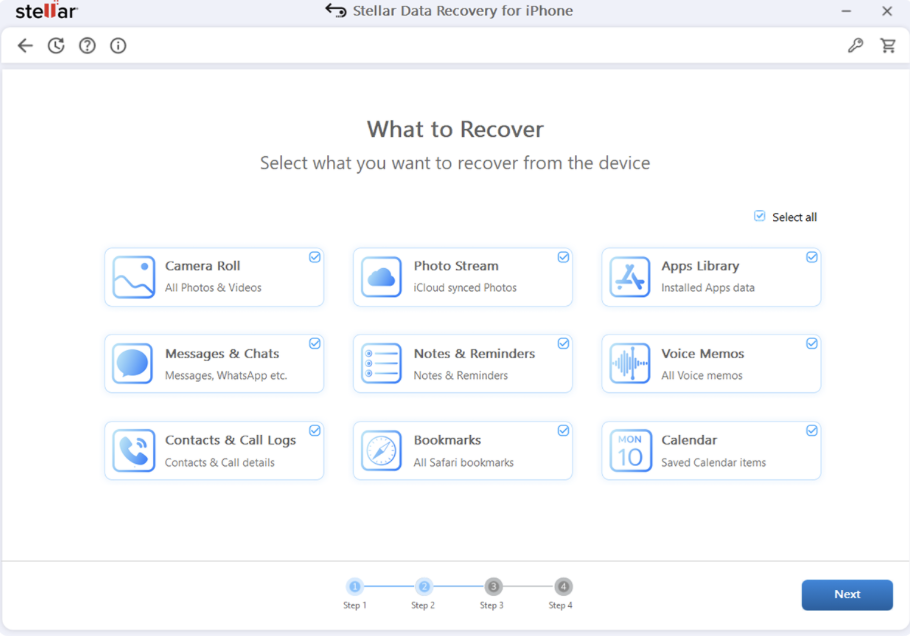
Why? It doesn’t ask you to jailbreak your iPhone. That matters. Jailbreaking opens security holes and can make future iOS updates messy. Stellar scans through a normal computer connection and keeps your phone’s existing setup intact.
It can recover directly from the iPhone, not just from backups. That’s important because many people don’t back up often enough. If the photo or message is still on the device, Stellar can look for it.
It also reads iTunes and Finder backups, including encrypted ones. If you have a backup but don’t want to restore the entire phone, this saves time. You can pull out only the missing photos or texts instead of rolling the whole device backward.
The preview feature is the real sanity saver. You can see recoverable photos and message threads before paying. No guessing. You check what’s there, select it, and save it.
It also keeps up with recent iOS releases, including iOS 27, which matters if you’re on a newer iPhone and don’t want to guess whether the software will recognize your device.
How the recovery process goes
The workflow is simple:
1. Connect your iPhone to a Windows or Mac computer—the software runs on the computer, not the phone.
2. Launch Stellar Data Recovery for iPhone.
3. Choose data types: photos, messages, attachments, videos, WhatsApp chats, contacts, call history.
4. Start the scan. If the regular scan misses something, run Deep Scan.
5. Preview results.
6. Save recovered files to the computer first.
Saving to the computer matters. It reduces the chance of overwriting anything still recoverable on the phone.
The demo version lets you scan and preview, and recover up to 10 files. That’s enough to check whether your missing photos or texts are still there before buying.
What about iCloud?
People confuse iCloud syncing with local backups. iCloud is useful, but it is not the same as browsing an iTunes/Finder backup file by file. The current Stellar iPhone Data Recovery workflow focuses on the device and iTunes/Finder backups. If your only copy is in iCloud and you don’t have a local backup or on-device data, your options are narrower.
That’s why speed matters. Stop taking new photos, downloading big files, or restoring old backups until you’ve tried recovery.
Can you recover permanently deleted iPhone photos?
Often, yes—if they haven’t been overwritten. “Permanently deleted” is Apple’s interface term, not a guaranteed physical wipe. The storage space is marked available. Until something new uses that space, recovery software may still find files.
Messages are trickier because they sit in databases and may include attachments. Stellar can recover iMessages, SMS, attachments, and some supported chat data, depending on what’s present.
No tool can promise 100% success after every scenario. Water damage, a full reset, heavy new usage, or a long delay can lower the odds. But if the deletion was accidental and you caught it quickly, your chances are better than most people think.
Why I put Stellar iPhone Data Recovery above free tools
Free sounds nice until you spend an afternoon getting nowhere. Many free tools recover only a tiny number of files, hide results behind ads, or fail on newer iOS versions. Others scan shallow and return thumbnails that won’t open.
Stellar is not free, but the demo lets you verify results first. That’s the difference between guessing and knowing. If the missing family photo or important message shows up in preview, you can decide whether recovery is worth it. If it doesn’t, you haven’t paid for a miracle.
FAQs
Can I recover deleted iPhone photos without a backup?
Often, yes. If the photo data is still on the device, connect your iPhone to a computer, run Stellar Data Recovery for iPhone, choose Photos, scan, preview, then save images to your computer.
How do I recover deleted text messages on iPhone?
Start with Show Recently Deleted. If the messages are gone, use Stellar to scan the device or an iTunes/Finder backup. It can recover messages and attachments, and lets you preview them before saving.
Does iPhone data recovery require jailbreaking?
No. Stellar iPhone Data Recovery does not require a jailbreak. It scans the device or backup files from a computer, keeping your iPhone’s normal security setup intact.
Can the software recover from encrypted iTunes backups?
If you know the backup password, yes. Stellar can scan encrypted iTunes backups and recover selected photos, messages, and other supported data without restoring the entire backup to your phone.
How long do I have to recover deleted photos?
As soon as possible, honestly. The more you use the iPhone after deletion, the higher the chance new data overwrites the deleted files. Stop installing apps, shooting videos, or restoring backups until you’ve scanned the device.
Final thought
If you lost iPhone photos or messages, don’t restore a backup yet, and don’t assume the files are gone. Check Recently Deleted, then use a recovery tool that can show what’s still recoverable. For most people, Stellar Data Recovery for iPhone is the safest starting point because it scans the device, reads iTunes/Finder backups, previews results, and avoids unnecessary jailbreak or full-restore headaches.
Try Stellar Data Recovery for iPhone free!